



If you've ever held shares in your NSDL demat account and later needed to shift them to a CDSL account, maybe because your broker changed or you wanted to manage all holdings in one place, you’re not alone. Many investors in India go through this process every year, and the good news is, it can now be done online.
In this blog, you’ll get a complete guide on how the NSDL to CDSL shares transfer online works. We’ll cover the basics like what NSDL and CDSL are, the key differences between them, and common reasons why investors choose to make this switch.
You’ll also learn what documents or details are needed, the simple steps to transfer shares online, and how to track the transfer status. If the online option isn’t available in your case, we’ll also walk you through the offline method. Lastly, we’ll explain any charges that may apply during the transfer.
Let’s get into it!
Quick Summary
NSDL and CDSL are India’s two main depositories that hold your shares in digital form.
You can transfer shares from NSDL to CDSL online using platforms like Speed-e and Easiest.
The transfer usually takes 2–5 working days and may involve small charges from your broker or DP.
PAN verification is mandatory, and dividends are not affected during the transfer process.
Mutual funds cannot be transferred through this method, you need to manage them separately.
What Is NSDL?
NSDL, or National Securities Depository Limited, is India’s first and largest depository that holds your shares and other securities in digital form. It works just like a bank, but instead of money, it stores your investments like stocks, bonds, mutual fund units, and other financial instruments. When you buy shares through the stock market, they are held in your demat account with NSDL if your account is linked to a Depository Participant (DP) registered with NSDL.
With NSDL explained, let’s move on to understanding CDSL.
What Is CDSL?
CDSL, or Central Depository Services Limited, is the second major securities depository in India, working under the regulation of SEBI. Just like NSDL, it holds your shares and other securities in electronic form through a demat account. If your demat account is opened with a DP linked to CDSL, then all your holdings are stored with CDSL. It helps you manage, transfer, and monitor your securities without dealing with physical paperwork. CDSL mainly works with stockbrokers, banks, and other financial institutions to provide safe and easy access to your digital holdings.
With the basics of both depositories covered, it's helpful to compare them side by side.
Key Differences Between NSDL and CDSL
A quick comparison of NSDL and CDSL highlights the main differences in their structure, services, and focus areas that are important for Indian demat account holders.
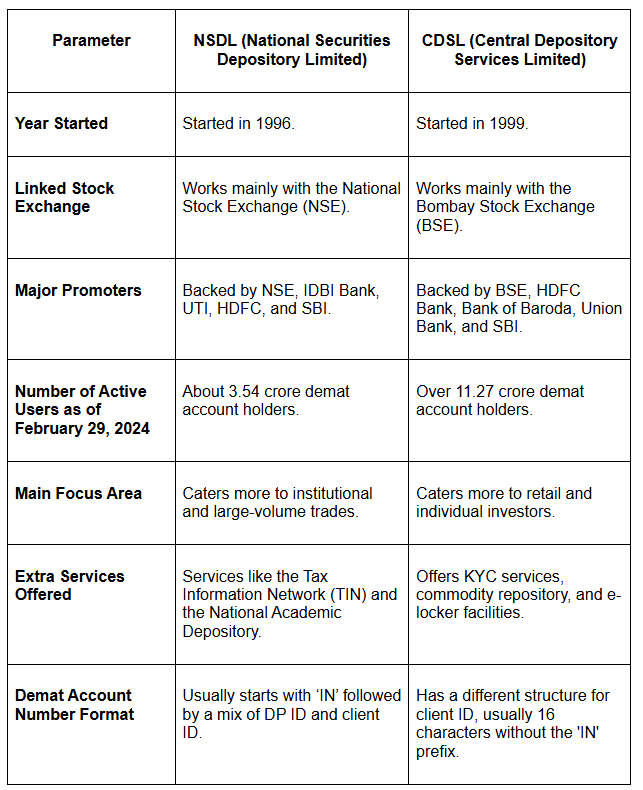
Now that you know how NSDL and CDSL differ, let’s look at some common reasons why investors choose to transfer their shares between them.
NSDL to CDSL Transfer: Fast & Easy
Transfer shares from NSDL to CDSL effortlessly. Avoid delays, manage your demat account smoothly, and experience hassle-free transactions. Start now!

Why Transfer Shares from NSDL to CDSL?

There are some simple and practical reasons why you may choose to transfer your shares from NSDL to CDSL. It usually comes down to ease of use, broker preferences, or managing everything in one place. Here’s why this transfer makes sense for many:
Easier Account Management: If you have demat accounts with both NSDL and CDSL, shifting everything to one depository like CDSL helps you manage your holdings from a single account.
Broker Compatibility: Some stockbrokers work only with CDSL. If your broker is linked to CDSL, moving your shares from NSDL can make trading and account operations smoother.
Better Platform Experience: CDSL and NSDL provide different user platforms. You might find CDSL’s online portal easier to use for checking your holdings or managing transfers.
Online Transfer Support: Transfers between NSDL and CDSL are now possible online, making the process faster and more convenient without needing to visit your DP.
Less Paperwork: Choosing the online route helps you avoid physical forms or branch visits, saving you time and reducing manual steps.
Once you’ve decided to move your shares, the next thing to check is how much it might cost.
Charges Applicable for NSDL to CDSL Transfer
Before starting the transfer process, it’s important to understand the charges that may apply when moving your shares from NSDL to CDSL in 2025.
No Direct NSDL Charges: NSDL doesn’t charge investors directly. Instead, it charges your DP, who may pass on the cost to you.
Broker/DP Fees Vary: Most brokers or DPs charge a fee for such transfers. This can be a fixed amount per transaction or based on the number of securities (ISINs) being transferred.
Typical Fee Range: Many brokers charge a flat fee, usually between ₹20 to ₹25 per transaction or per security, plus GST and other applicable taxes.
Online Transfers May Still Incur Fees: Even if you're using platforms like NSDL’s Speed-e or CDSL’s Easiest, your broker might still charge a fee for the service.
Higher Cost Than Intra-Depository Transfers: Since this involves two different depositories (NSDL and CDSL), charges are generally a bit higher than transfers within the same depository.
Always Confirm in Advance: It's best to check with your broker or DP beforehand to know the exact charges you’ll need to pay for the transfer.
Once you're clear on the costs involved, the next step is understanding how to complete the transfer from NSDL to CDSL.
Simple 6 Steps To Transfer Shares from NSDL to CDSL Online
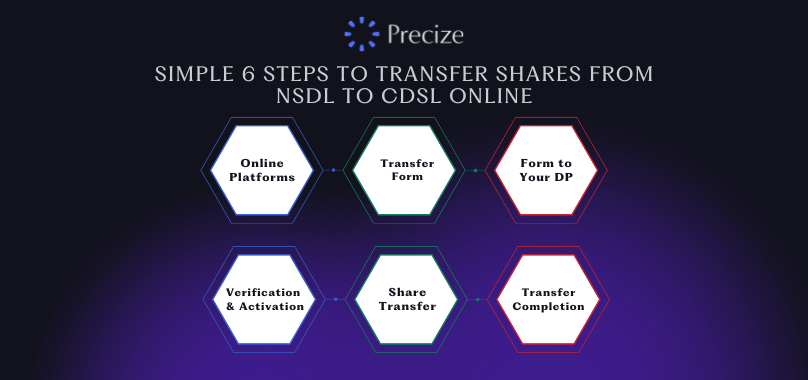
If you're planning to move your shares from an NSDL demat account to a CDSL demat account, the process is fairly straightforward. Here is how you can do it step by step:
Step 1: Register on the Online Platforms
Go to the NSDL SPEED-e portal and sign up using your demat account details like DP ID, Client ID, and email ID.
You may also need to register on the CDSL Easiest portal, depending on the process followed by your new DP.
Step 2: Download and Fill Out the Transfer Form
Get the NSDL SPEED-e registration form from the NSDL website or ask your DP for it.
Fill in the form carefully, mentioning both your NSDL (sending) and CDSL (receiving) account details.
Step 3: Submit the Form to Your DP
Submit the completed form to your NSDL-linked DP. The DP will check your details and send the request to NSDL and CDSL for further processing.
Step 4: Wait for Verification and Activation
Once submitted, your information will be verified by the depository.
After approval, you’ll get login credentials by email to access the SPEED-e or Easiest portal for online transfers.
Step 5: Start the Share Transfer
Log in using the provided credentials. Choose the option to transfer shares from your NSDL to your CDSL account.
Enter your CDSL account details, including the DP ID, Client ID, and the quantity of shares to be transferred.
Authorize the transfer; this might require an OTP or a digital signature.
Step 6: Transfer Completion
Once the request is processed, your shares should show up in your CDSL demat account within 3–5 working days.
Things to Keep in Mind:
Both NSDL and CDSL accounts must be active and in your name.
Some DPs may charge a fee for inter-depository transfers.
Shares that are pledged, locked-in, or frozen can’t be transferred online.
Always double-check your details to avoid delays or rejection.
After submitting your transfer request, it’s important to keep an eye on its progress.
How to Track Your Transfer Status from NSDL to CDSL Online
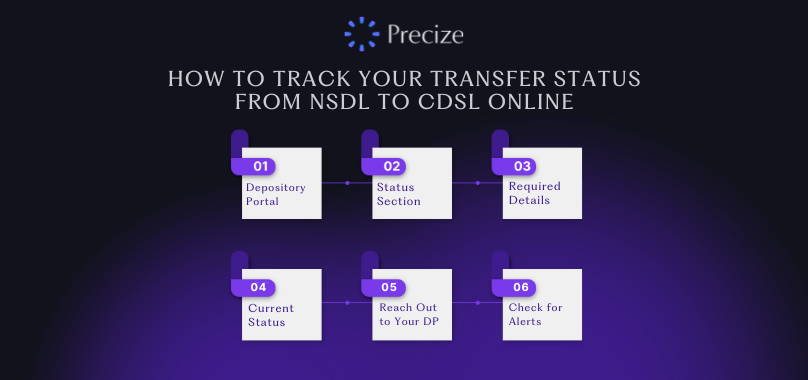
Once you’ve started the NSDL to CDSL shares transfer online, keeping track of the progress is easy. You just need to follow a few simple steps to see whether your request has been completed or is still pending.
Log in to Your Depository Portal
Use your login credentials to access the platform where you submitted the transfer, either NSDL’s SPEED-e or CDSL’s Easiest portal.
Go to the Transfer Status Section
Look for a tab or option labeled something like “Transfer Status,” “Transaction History,” or “Inter-Depository Transfers.” This section lists all your ongoing and completed transfer requests.
Enter the Required Details
You might be asked to enter information such as your DP ID, Client ID, or transaction reference number to check the status of a specific request.
View the Current Status
The system will show you updates like “Pending,” “Processed,” or “Completed.” If there's a delay or rejection, the reason will also be displayed.
Reach Out to Your DP
If the status hasn’t changed for a while or something doesn’t look right, contact your DP. They’ll be able to check the backend and help fix any issues.
Check for Alerts
You may also get SMS or email notifications once your shares are successfully transferred. Make sure your mobile number and email are updated in your demat account for timely alerts.
If you’re unable to use the online method or prefer paperwork, there's also an offline way to complete the transfer.
Offline Transfer Method Shares from NSDL to CDSL (If Online Option Isn’t Available)
If the online transfer option isn’t available, you can still transfer shares from NSDL to CDSL using the offline method. This involves filling out and submitting a physical Delivery Instruction Slip (DIS) to your NSDL depository participant. Here's how to do it:
Get the DIS: Ask your current NSDL DP (broker or financial institution) for a DIS booklet if you don’t already have one. This slip is needed to start the transfer.
Fill Out the DIS Form Correctly: Enter all required details, including:
Your NSDL demat account number (DP ID and Client ID).
Your target CDSL demat account number (DP ID and Client ID).
Tick the box for “Inter-Depository Transfer”.
Mention the ISIN (International Securities Identification Number) for each stock you want to transfer.
Write the number of shares to be transferred for each ISIN.
Sign the form exactly as per the signature linked with your DP.
Submit the Form to Your NSDL DP: Once filled, hand over the DIS form to your DP. They’ll process the request and give you an acknowledgment slip for reference.
Wait for the Transfer to Be Processed: The transfer usually takes about 2 to 5 working days. After that, the shares will appear in your CDSL demat account.
Check for Applicable Charges: Some DPs may charge a small fee for handling inter-depository transfers. It’s a good idea to check with your broker or DP beforehand.
Unlock Exclusive Private Equity Opportunities
Explore unique investment options in unlisted shares and global trade finance. Start diversifying your portfolio with Precize today.
Conclusion
Now that you've seen the complete process of NSDL to CDSL shares transfer online, along with key differences between the two depositories, reasons for making the switch, requirements, and both online and offline methods, the entire journey should feel more manageable.
Whether you're consolidating demat accounts, aligning with your broker, or simply preferring CDSL's services, the transfer can be done smoothly if the steps are followed carefully.
For those interested in exploring investment opportunities beyond listed shares, Precize is an alternative investment platform in India that offers access to private equity and private credit opportunities. With reserved access to a diversified portfolio, Precize gives you a chance to expand your investment horizon in a more structured way.
Frequently Asked Questions (FAQs)
1. Can you transfer mutual funds through this method?
No, this method is only for transferring shares and securities. Mutual funds can't be moved using the NSDL to CDSL transfer process. You’ll need to redeem or switch mutual funds separately through your mutual fund platform or registrar.
2. Will you lose dividends during the transfer?
No, you won’t lose any dividends. If a dividend is declared while your shares are being transferred, it will still be credited to your linked bank account as usual.
3. How long does the transfer take?
The NSDL to CDSL transfer usually takes between 2 to 5 working days after your request is submitted through your depository participant, either online or offline.
4. Is PAN verification needed?
Yes, PAN verification is required for the transfer to go through. Both your PAN and the recipient’s PAN must be verified to meet regulatory guidelines.
5. Can shares be transferred between two DPs under the same depository?
Yes, if both DPs are under NSDL or both are under CDSL, you can transfer shares between them. This is called an intra-depository transfer and is usually faster and easier than moving shares between NSDL and CDSL.
Disclaimer
The information provided in this blog is for general understanding and educational purposes only. It should not be considered financial, investment, or legal advice. Always consult your depository participant, broker, or financial advisor before making any decisions related to demat account transfers or investment platforms. While efforts have been made to ensure accuracy, processes and policies may change over time, and it's best to verify details with official sources.